Usage Management and Resource Add-ons
Resource management in MsgBox is divided into Fixed Subscription Usage and Consumable Credits. You can monitor usage progress in the backend and perform dynamic expansion at any time based on your business needs.
1. Resource Usage Classification
In MsgBox, your available resources are categorized into the following two types:
1.1 Subscription Resources (Seats and Channels)
- User Seats: Refers to the total number of members you can invite to join the system.
- Number of Channels: Refers to the total number of social channels you can connect, such as WhatsApp Business accounts, WeChat Work, Xiaohongshu, etc.
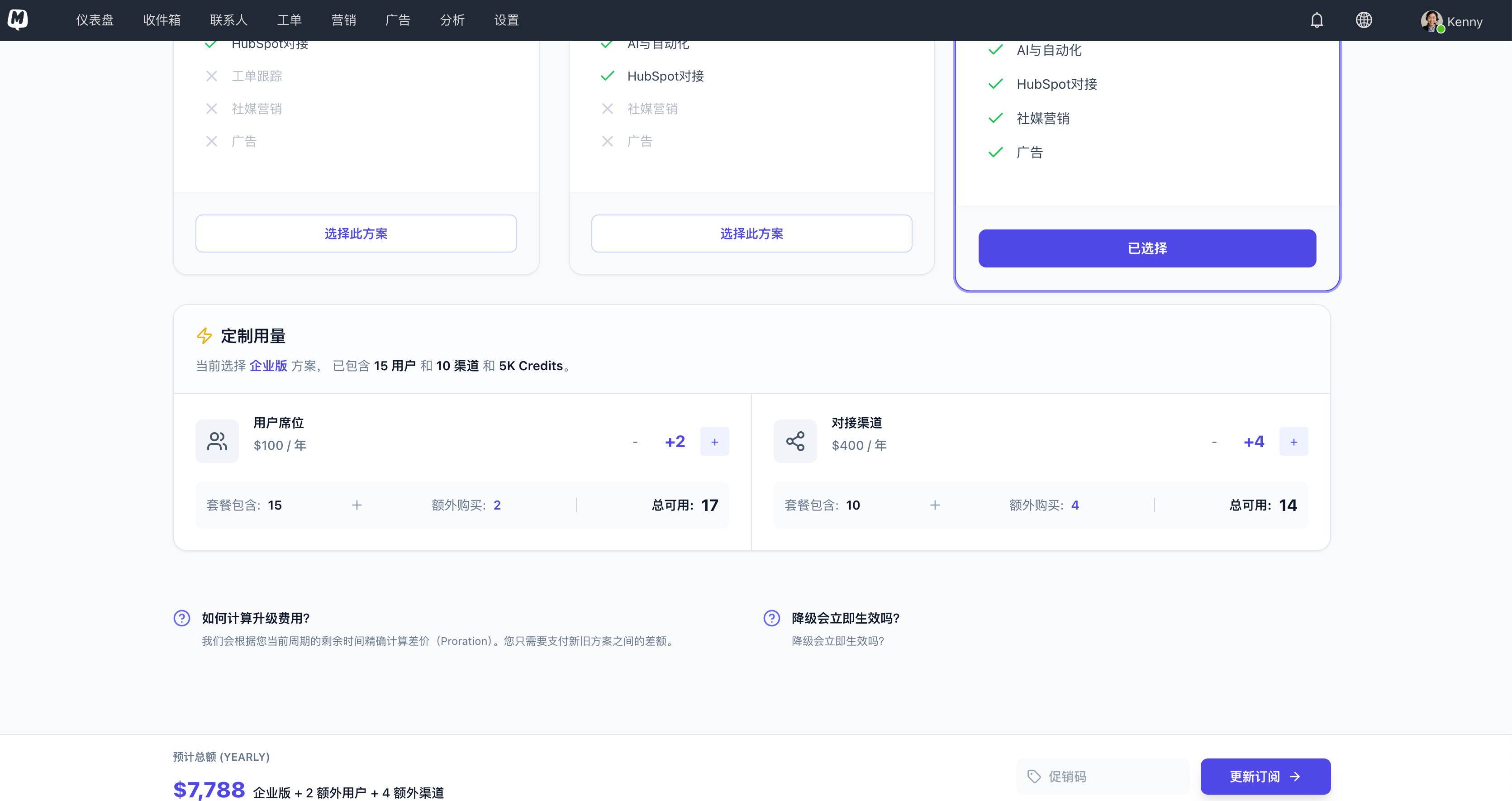
- Add-on Logic: These items are part of your subscription configuration. To increase them, please go to Subscription Details > Upgrade Plan to perform an Add-on. The system will automatically calculate the price difference for the current cycle, and it will take effect immediately after successful payment.
1.2 Consumable Resources (Credits)
- Credits: Used for operations that involve actual consumption, such as sending SMS.
- Add-on Logic: Click Purchase Extra directly on the Subscription Details > Resource Usage > Credits page. There is no need to adjust your subscription plan.
2. Monitor Your Usage Status
You can go to Top-right Avatar > Plans & Billing > Subscription Details > Resource Usage to view the real-time usage of various metrics.
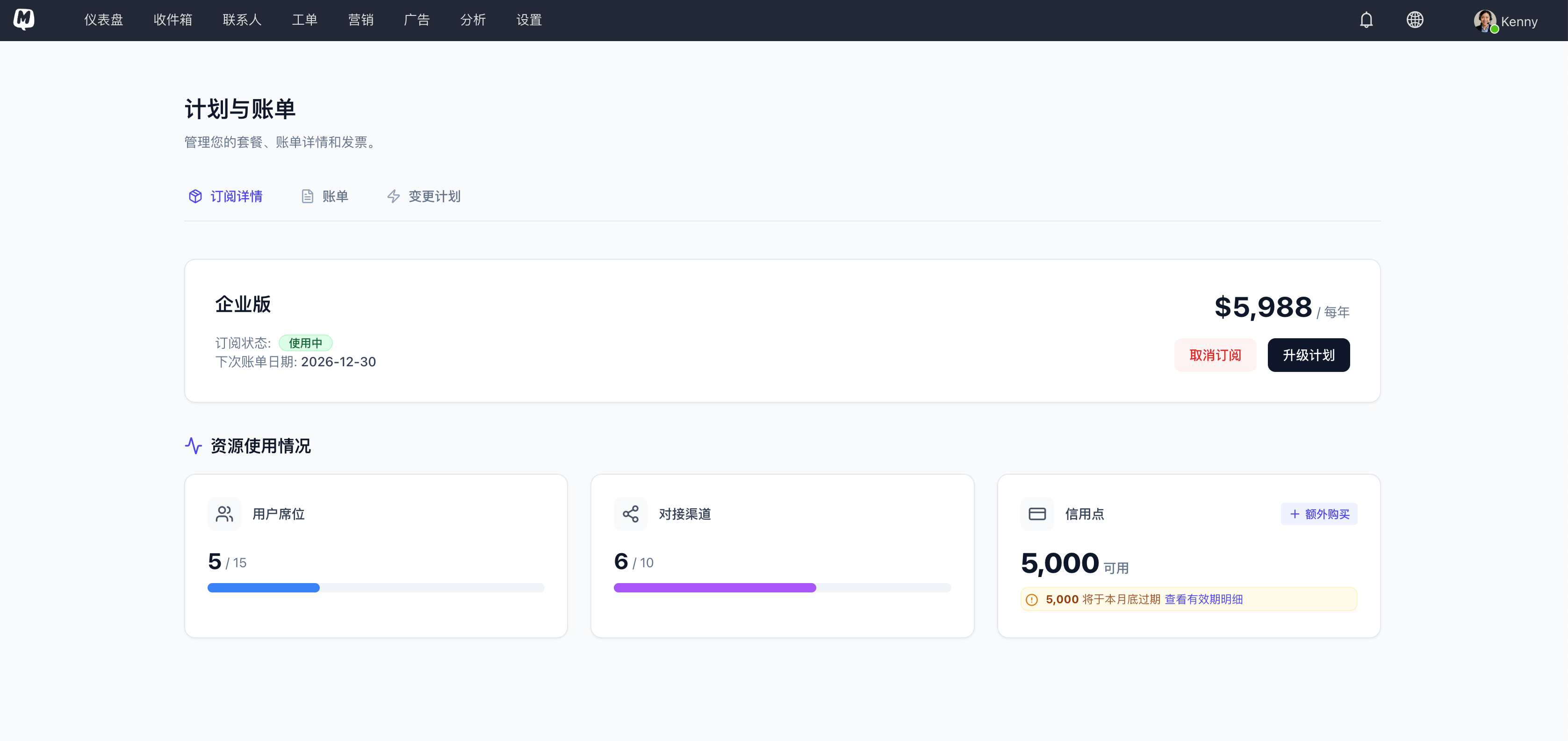
- Seats and Channels: Displays Used quantity / Total quota.
- Credit Balance: Displays only the total points currently available.
3. Deep Dive into Credit Billing Logic
The Credit balance consists of Monthly Complimentary Credits and Purchased Credits, with different expiration rules:
3.1 Monthly Complimentary Quotas by Version
At the start of each subscription cycle (monthly), the system automatically injects complimentary credits based on your version:
| Subscription Version | Monthly Complimentary Credits | Validity Description |
|---|---|---|
| Basic | 1,000 (1K) | Automatically cleared at the end of each month |
| Professional | 2,000 (2K) | Automatically cleared at the end of each month |
| Enterprise | 5,000 (5K) | Automatically cleared at the end of each month |
3.2 Purchased Credits
- Validity: Valid for 1 year from the date of purchase.
- Consumption Order: The system will prioritize consuming credits that are about to expire (usually the monthly complimentary portion first).
Since monthly complimentary credits expire at the end of the month, we recommend using your complimentary points for routine marketing first. Purchase additional credits only when a surge in business volume exceeds your complimentary quota.
4. How to Purchase Add-ons?
- Enter the Subscription Details page.
- For seat or channel requirements, click Upgrade Plan.
- Increase the quantity in the configuration interface; the system will display the Price difference required for this update.
- For Credit requirements, directly select the corresponding Credit Pack to pay.
Related Guides: