Channel Proactive Messaging Limits
To prevent excessive marketing and protect the user experience, major social platforms (such as WhatsApp and WeChat) have "Service Window" restrictions. If a contact has not replied within a certain period, the system will prohibit sending regular messages.
1. Comparison of Messaging Windows by Channel
Once the following time has elapsed since the contact's last message, you will no longer be able to send standard text messages directly through the inbox:
| Channel Name | Window Limit | Official Policy Reference |
|---|---|---|
| WhatsApp Business | 24 Hours | WhatsApp Business Policy |
| WeCom (Work WeChat) | 48 Hours | WeCom Customer Service API Doc |
| WeChat Official Account | 48 Hours | WeChat Service Message Rules |
2. How to Check Remaining Session Time?
In the MsgBox inbox, you can monitor the active status of a conversation in real-time:
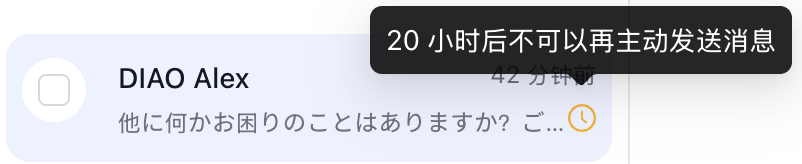
- Status Icon: Click the "Clock Icon" next to the contact's name in the conversation list.
- Risk Alert: A floating window will appear, informing you how many minutes or hours remain before the session expires.
3. How to Resume Dialogue After the Window Expires?
If a session has exceeded its validity period, you can try the following methods to re-activate communication:
For WhatsApp Business (WABA)
- Send Template Messages: This is currently the only way to proactively reach out and break the 24-hour limit. You can send pre-approved WhatsApp Template Messages. Once the customer replies to the template, the 24-hour service window will reset.
For WeChat / WeCom
- Wait for Customer Initiative: According to platform policies, it is currently impossible to proactively "wake up" a timed-out WeChat session via API.
- External Outreach: If you have the contact's phone number, you can try sending an SMS Broadcast to guide the customer back to social channels for communication.
- System Interception: When the window ends, the MsgBox chat input box will turn grey and uneditable, displaying the prompt "Session Expired."
- Message Billing: Sending WhatsApp template messages incurs additional costs based on official Meta standards. Please ensure your Credit Balance is sufficient.
To avoid session timeouts, it is recommended to configure AI Agents for instant reception during non-working hours, or set up Automated Alerts to prompt human agents to complete the first follow-up within 24 hours.
Related Guides: